
If you’ve ever typed # Heading into a text box and wondered why it didn’t turn bold, you already know why Markdown editors exist. Markdown is now the default writing format for READMEs, technical docs, blog drafts, changelogs, and note-taking apps — but most people still don’t have a fast, private, free place to write it, preview it, and turn it into something usable like HTML or PDF.
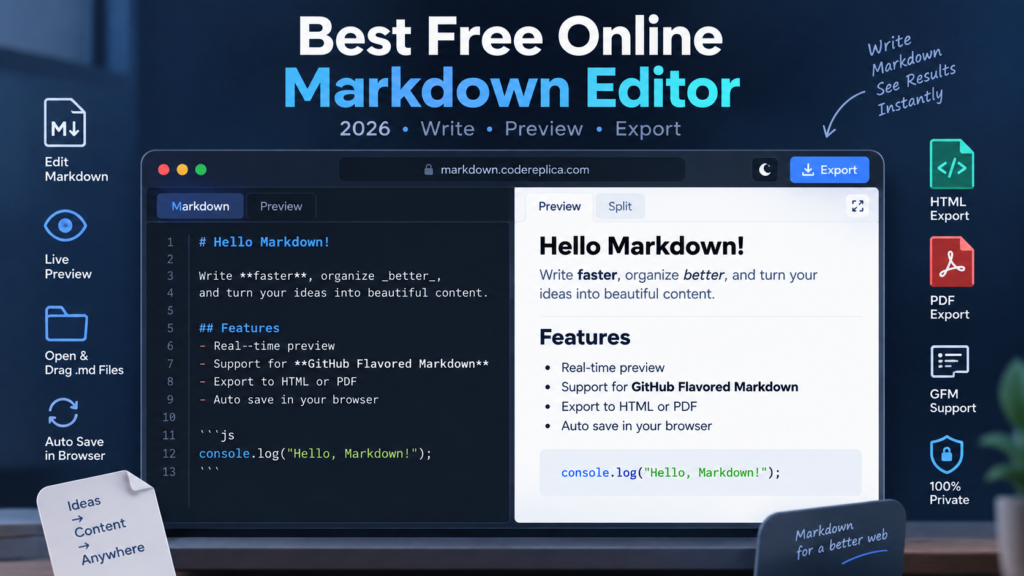
That’s exactly the gap the CodeReplica Markdown Viewer, Reader & Live Editor fills. It’s a browser-based Markdown editor with a real-time split-screen preview, full GitHub Flavored Markdown (GFM) support, and one-click export to HTML and PDF — with zero installs, zero sign-ups, and zero data ever leaving your browser.
This guide covers what Markdown is, why an online editor beats installing desktop software for most people, and exactly how to use the tool to convert Markdown to HTML or PDF in under a minute.
What Is Markdown, in One Sentence?
Markdown is a lightweight plain-text formatting syntax — things like **bold**, # heading, and - list item — that gets converted into styled HTML, so you can write formatted documents using nothing but a keyboard and a text file.
It was designed to be readable even before it’s converted, which is why it’s become the standard for:
- GitHub/GitLab README files and pull request descriptions
- Static site generators and technical blogs (Jekyll, Hugo, Next.js MDX)
- Developer documentation and API references
- Note-taking apps like Obsidian and Notion exports
- Changelogs, RFCs, and internal wikis
Why Use an Online Markdown Editor Instead of a Desktop App?
A browser-based Markdown editor is the faster choice whenever you need to write or convert Markdown without committing to installing and configuring desktop software. Here’s the direct comparison:
| Need | Desktop App (Obsidian, Typora, VS Code) | Online Markdown Editor |
| Setup time | Download, install, configure plugins | Zero — opens instantly in any browser |
| Cost | Often free but some require license (Typora) | Completely free |
| Cross-device use | Tied to one machine/OS | Works on any device with a browser, including Chromebooks and tablets |
| Quick one-off edit | Overkill for a single file | Ideal — drag, edit, export, done |
| Export to PDF | Usually needs a plugin or print-to-PDF workaround | Built-in one-click Save .pdf |
| Export to clean HTML | Often needs manual copy-paste cleanup | Built-in Copy HTML / Save .html |
| Data privacy | Local by default | 100% client-side — nothing uploaded to a server |
If you just need to read a .md file someone sent you, draft a quick README, or convert notes into a shareable PDF, a desktop app is unnecessary friction. The CodeReplica Markdown Editor does the same job in one open browser tab.
Key Features of the CodeReplica Markdown Editor
1. Real-Time Split Editor with Sync Scroll
Write in the left pane and watch the formatted output render instantly in the right pane. The two panes scroll in sync, so you never lose your place when reviewing a long document. You can also toggle Editor Only or Reader Only mode for a distraction-free, single-pane view while drafting.
2. Full GitHub Flavored Markdown (GFM) Support
Beyond basic headings and bold text, the editor correctly renders the GFM extensions that plain Markdown parsers often miss:
- Task lists —
- [x] Doneand- [ ] Todo - Tables with proper column alignment
- Strikethrough —
~~text~~ - Fenced, syntax-highlighted code blocks
- Auto-linked URLs
3. One-Click Markdown to HTML Conversion
Click Copy HTML to grab clean, semantic markup ready to paste into a CMS or codebase, or click Save .html to download a complete, self-contained, responsive HTML5 file.
4. One-Click Markdown to PDF Conversion
Click Save .pdf and the tool generates a print-ready PDF with proper pagination, preserved headings, and formatted code blocks — no separate converter or print-dialog workaround needed.
5. Drag-and-Drop File Support
Drop any .md, .markdown, or .txt file directly onto the page, or use the Open File button. It loads instantly into both the editor and the live Reader view — useful for quickly reading a README a colleague sent you without cloning the repo.
6. Live Word Count and Reading Time
The status bar tracks words, characters, lines, and estimated reading time as you type — handy for blog drafts and documentation with length targets.
7. 100% Client-Side Privacy
Every part of the process — parsing, rendering, and file conversion — happens locally in your browser via JavaScript. No Markdown text, uploaded file, or generated PDF is ever transmitted to a server. This matters if you’re editing proprietary docs, internal notes, or anything under NDA.
8. Smart Autosave
Your content is automatically persisted in local browser storage, so an accidental tab close or refresh doesn’t wipe out your draft.
How to Convert Markdown to HTML Online (Step by Step)
- Open the Markdown Viewer, Reader & Editor.
- Paste your Markdown into the left editor pane, or drag a
.mdfile onto the page. - Check the formatted result in the live preview pane on the right.
- Click Copy HTML to copy the markup straight into your clipboard, or click Save .html to download a full HTML5 file.
How to Convert Markdown to PDF Online (Step by Step)
- Open the Markdown Editor tool.
- Type your content or click Open File to load an existing
.mddocument. - Optional: switch to Reader mode to check typography and table layout before exporting.
- Click Save .pdf to instantly download a clean, print-optimized PDF.
Who Actually Uses a Markdown Editor Like This?
- Developers writing or reviewing README files, CONTRIBUTING guides, and pull request descriptions before pushing to GitHub.
- Technical writers drafting documentation that needs to be exported as both a webpage and a distributable PDF.
- Students and researchers converting lecture notes or Obsidian exports into a clean PDF for printing or submission.
- Bloggers who write in Markdown for static site generators (Hugo, Jekyll, Next.js) and want an instant visual check before committing the file.
- Anyone forwarded a
.mdfile who doesn’t want to install a code editor just to read it.
Frequently Asked Questions
What is the best free online Markdown editor?
For most people who need live preview, GitHub Flavored Markdown support, and built-in HTML/PDF export without installing software, the CodeReplica Markdown Viewer, Reader & Editor covers the full workflow in one free browser tool.
Can I open and view a .md file directly from my computer?
Yes. Drag and drop any .md, .markdown, or .txt file directly into the editor, or use the Open File button — it renders instantly in both the editor and the live Reader view.
How do I convert Markdown to PDF for free?
Paste or open your Markdown document in the editor, then click Save .pdf. The tool generates a clean, print-ready PDF with preserved headings, tables, and code blocks — no account or software installation required.
How do I export Markdown to HTML?
Use Copy HTML to copy clean markup straight into a CMS or codebase, or Save .html to download a complete, self-contained HTML5 file.
Is it safe to paste sensitive or proprietary Markdown into an online editor?
With this tool, yes — all parsing, rendering, and file conversion happen entirely client-side in your browser. No text or file you enter is uploaded to or stored on any server.
Does the editor support GitHub Flavored Markdown (GFM)?
Yes, including tables, task checkboxes (- [ ] / - [x]), strikethrough, fenced code blocks with syntax highlighting, and automatic URL linking.
Do I need to create an account to use it?
No. There’s no sign-up, login, or installation — open the page and start writing.
Try It Now
Skip the desktop app and the plugin hunting. Open the free CodeReplica Markdown Editor, paste in your content, and export it as clean HTML or a print-ready PDF in seconds — entirely in your browser, entirely private.